
Language

In-House vs. Managed Services: Finding the Right Balance Between Cost and Operational Efficiency

For most businesses, the real work begins after migration. Once systems are live, keeping cloud environments secure, reliable, and cost-efficient takes continuous attention. Infrastructure maintenance, security, backup management, and cost optimization each call for specialized expertise.
That raises a practical question: who should take on this work, an in-house cloud team or a Managed Service Provider (MSP)? This article examines the two approaches, their key differences, and how businesses can combine internal resources with external expertise to improve operational efficiency while keeping costs under control.
A Managed Service Provider (MSP) is a specialized partner that manages and maintains a company's cloud environment within an agreed scope of services. With expertise in cloud technologies and operations, an MSP provides ongoing support to keep cloud infrastructure running smoothly.
Unlike simply purchasing cloud resources or renting cloud infrastructure, managed services cover the day-to-day operational work that continues after migration. This allows internal IT teams to focus on their core businesses and strategic priorities rather than handling every aspect of cloud operations.
Typical managed cloud services include:
IT support has traditionally followed a break-fix model: when something goes down, someone steps in to fix it. Modern cloud management takes a more proactive approach.
Automated monitoring helps detect potential issues before they disrupt operations, while regular usage and performance reviews uncover underutilized resources and opportunities to improve cloud architecture. Rather than simply reacting to problems, MSPs help businesses keep their cloud environments reliable, secure, and efficient over time.
Cloud providers manage the underlying infrastructure, including data centers, hardware, and networks. Everything built on top of it remains the business’s responsibility: operating systems, applications, access controls, data, and cloud spending.
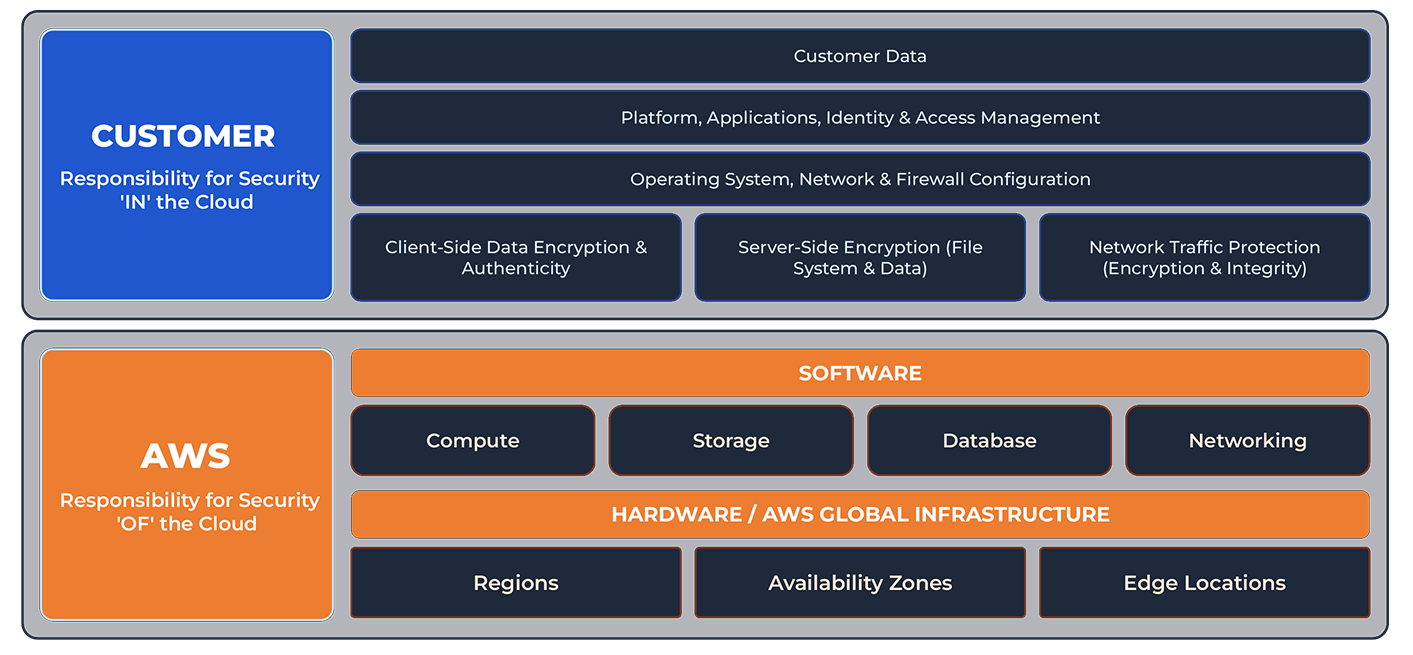
Four key areas require continuous attention:
The cloud’s flexibility doesn’t make it immune to failure. Misconfigurations, software updates, and traffic spikes can all disrupt services. For services that run around the clock, businesses need monitoring and incident response outside business hours to minimize downtime.
Under the shared responsibility model, cloud providers secure the infrastructure, while businesses manage access permissions, network security, data encryption, and system updates. Misconfigured permissions and exposed credentials can leave cloud environments vulnerable.
Backup plans that have never been tested often fail when they’re needed most. Businesses must define backup schedules and retention policies, then regularly test recovery procedures to ensure systems can be restored after failures or ransomware attacks.
Cloud costs fluctuate with usage. Idle resources, oversized instances, and cross-region data transfer fees can drive up bills. Regular reviews help identify waste and optimize spending.
An in-house cloud team offers greater control and a deeper understanding of internal systems and business needs. However, covering operations, security, backups, and cost management requires more resources than many businesses anticipate.
Engineers with expertise in cloud architecture, security, and automation are in high demand. Hiring cycles are long, and salary expectations are high. When experienced employees leave, valuable technical knowledge and operational expertise can leave with them.
Round-the-clock monitoring requires enough staff to cover shifts, time off, and incident response. For many small and mid-sized businesses, maintaining a dedicated on-call team for unpredictable incidents may not be cost-effective.
Cloud platforms evolve rapidly, with new services, features, and security threats emerging constantly. Teams need ongoing training and certifications to stay current, adding to the long-term cost of in-house operations.
When engineers spend too much time handling alerts, reviewing bills, and performing routine maintenance, less time is available for product development and business innovation. This opportunity cost may not appear on the balance sheet, but its impact can be significant.
Demand for managed cloud services is growing as businesses face increasing pressure to control cloud spending. According to Flexera's 2025 State of the Cloud Report, organizations exceed their cloud budgets by an average of 17%, while 60% now rely on MSPs in some capacity to manage their public cloud.
Cloud consulting partners are also evolving beyond cloud reselling and billing services toward long-term operations and management. As cloud platforms continue to expand their offerings, businesses must keep up with new technologies while maintaining security, system reliability, and cost control. These challenges are even greater in multi-cloud environments, where different platforms have their own architectures, management tools, and network configurations—making professional managed services increasingly valuable.
The right choice depends on your cloud scale, system complexity, and available internal resources. Here's how the two approaches compare across key management areas:
The choice isn't simply between managing everything in-house or outsourcing it all. For most businesses, the most effective model is a hybrid one: internal teams set the direction, while MSPs handle day-to-day cloud operations.
Shared Responsibilities in a Hybrid Model
This approach keeps businesses in control of their systems without having to staff round-the-clock coverage or hire for every specialized cloud function.
MSPs vary in service scope and quality. Before making a decision, consider these six key questions:
How can managed cloud services reduce operational workloads and cloud costs? Firstory, a leading podcast hosting platform in Taiwan, offers a real-world example.
As its platform grew, workloads were spread across multiple public clouds. This drove up cross-platform data transfer costs and required significant engineering effort to maintain service availability.
Going Cloud consolidated Firstory's GCP workloads on AWS using a 7R migration strategy, keeping downtime under four hours with Amazon RDS and optimizing content delivery through Amazon CloudFront.
Once the migration was complete, 24/7 managed services took over day-to-day operations, covering service monitoring, application performance monitoring, incident response, and ongoing architecture optimization. Firstory’s team no longer had to handle these tasks in-house.
Firstory reduced traffic costs by 30% and management costs by 25%. Improved content delivery also reduced latency and enhanced user experience. With operations off its plate, the team can now focus on serving creators and product development.
Managing the cloud doesn't have to fall entirely on your internal team. As an AWS MSP Partner, Going Cloud takes on the day-to-day work covered in this article, so your engineers can stay focused on building your business.
Our managed services include 24/7 technical support, automated monitoring, security and access management, ongoing cost and architecture optimization, and billing management through a dedicated platform. Choose a standard plan (8×5) for business-hour support, or an advanced plan (24×7) for round-the-clock coverage with backup implementation and monthly AWS service reports.
Whether you're exploring managed services or looking to optimize your existing cloud environment, start with a comprehensive cloud assessment to identify opportunities for improvement.
Need help managing your cloud environment?
Our cloud experts can help you streamline operations, optimize costs, and find the right managed services for your business.
Request a Consultation | Explore Our Managed Cloud Services